-
Shop
- Adidas
- Advanced Technologies
- Apple Accessories
- Best-Sellers
- Car Accessories
- Dating & Social Skills
- Digital Resources
- AI Skills
- Beauty
- Car Buying & Ownership
- Cozy Feast Collection
- Electronics & Technology
- Financial Education
- Hobbies
- Home Styling & Organization
- Mindset
- Online Business
- Parenting & Child Development
- Personal Style & Fashion
- Pet Lifestyle & Wellness
- Smart Life with AI
- Travel Planning
- Wellness
- Yoga & Fitness
- Education & Learning
- Family & Parenting
- Fashion
- Alexander McQueen
- Bags
- Bags & Wallets
- Balenciaga
- Belts
- Blazers
- Blouses & Shirts
- Bottega Veneta
- Brunello Cucinelli
- Burberry
- Chanel
- Chloé
- Dior
- Dolce & Gabbana
- Dresses
- Etro
- Fendi
- Gucci
- Hats & Hair Accessories
- Jacquemus
- Jewelry
- Jil Sander
- Keychains
- Kiton
- Luggage
- Luggage Bags
- Miu Miu
- Off-White
- Outerwear
- Prada
- Rick Owens
- Saint Laurent
- Socks & Tights
- The Row
- Tom Ford
- Valentino
- Valentino Garavani
- Versace
- Vivienne Westwood
- Watches
- Furniture
- Gadgets
- Health & Beauty
- Health & Wellness
- Home & Garden
- Kids & Babies
- Kitchen
- Lighting
- Patio, Lawn & Garden
- Personal Growth
- Pet Care
- Pet Supplies
- Pets
- Shoes
- Sport & Outdoors
- Stress Relief & Relaxation
- Travel
- Wealth
- Popular
- Best deals
4K Support on a 1080p Projector: What It Really Means
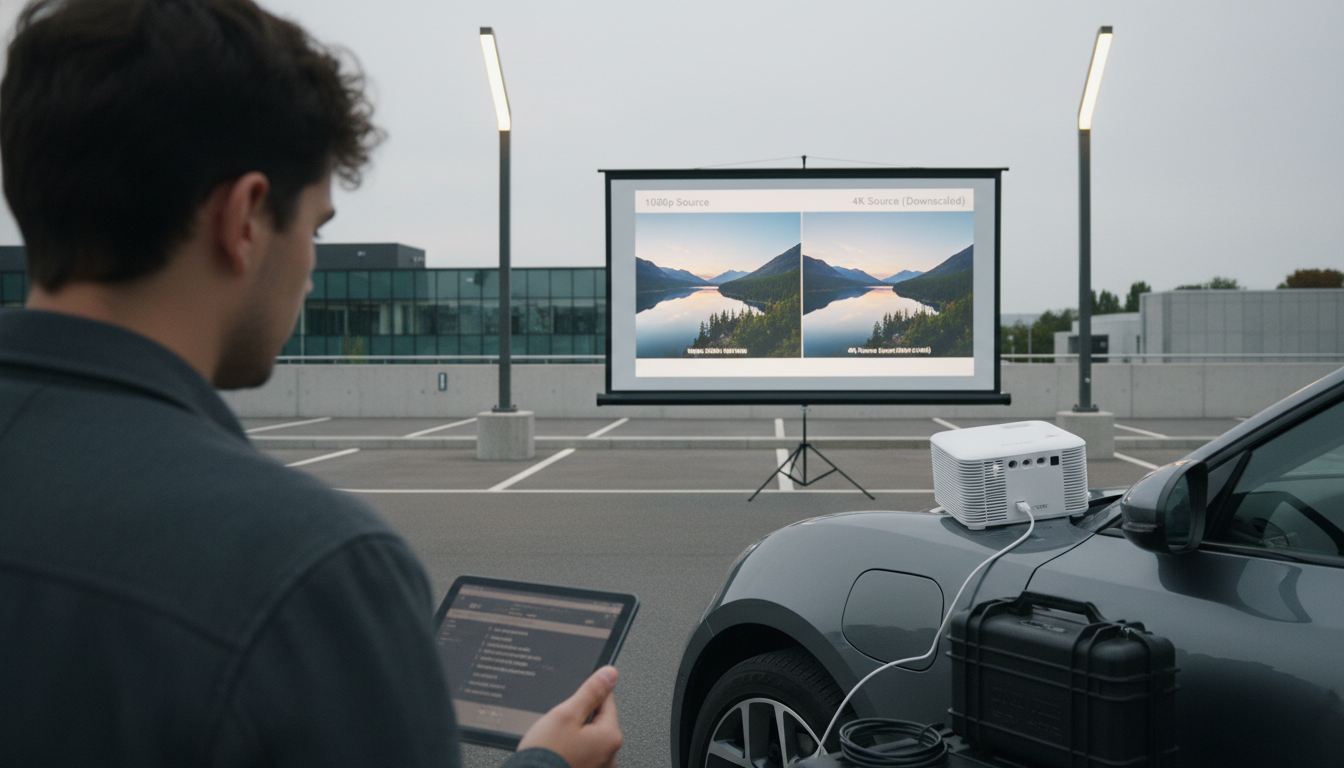
What does “4K support” mean on a 1080p projector, and will 4K videos look better?
On a 1080p projector, “4K support” usually means the projector can accept a 4K signal (like 3840 x 2160 from a streaming device, game console, or Blu-ray player) and then downscale it to the projector’s native resolution (1920 x 1080) to display it. The projector is not actually showing 8.3 million pixels on screen; it’s still limited by its 1080p imaging chip or panel.
How “4K support” works on a 1080p projector
When a device outputs 4K, the projector’s video processing converts that input into a 1080p image. This can be convenient because it reduces compatibility issues (no forced 1080p output setting needed) and can allow modern sources to play without errors. Some models also support HDR metadata or wide color input, but that doesn’t automatically mean you’ll get true HDR brightness or wide color performance—those depend on the projector’s light output, contrast, and color capabilities.
Will 4K videos look better than 1080p on a 1080p projector?
Sometimes, yes—but not because you’re seeing true 4K detail. A high-quality 4K stream or disc can look a bit cleaner after downscaling, with fewer compression artifacts, smoother edges, and a more refined image compared to a heavily compressed 1080p stream. The improvement is most noticeable when the 4K source has a higher bitrate (common with UHD Blu-ray) and when the projector’s scaling and sharpening are well tuned.
That said, don’t expect a dramatic leap in crispness like a real 4K projector provides. Screen size, seating distance, focus accuracy, and the quality of the lens often matter more than whether the input signal is 4K.
What to look for before buying
Check whether the projector supports HDMI 2.0/HDCP 2.2 for protected 4K content, what frame rates are accepted (4K/60 vs 4K/30), and whether there’s added input lag from scaling if gaming is a priority. For a deeper breakdown of compatibility and real-world picture differences, see the full guide here: https://lurican.com/blog/what-does-k-support-mean-on-a-p-projector-and-will-k-videos-look-better/.
FAQ
Does a 1080p projector with “4K support” play Netflix and Disney+ in 4K?
It can accept 4K-capable streams if the projector and streaming device meet HDMI/HDCP requirements, but the displayed image is still downscaled to 1080p. Streaming apps may also limit resolution based on device certification and bandwidth.
Recommended for you


Choosing an Ebook for Social Anxiety and Confidence
May 14, 2026







Leave a comment