-
Shop
- Adidas
- Advanced Technologies
- Apple Accessories
- Best-Sellers
- Car Accessories
- Dating & Social Skills
- Digital Resources
- AI Skills
- Beauty
- Car Buying & Ownership
- Cozy Feast Collection
- Electronics & Technology
- Financial Education
- Hobbies
- Home Styling & Organization
- Mindset
- Online Business
- Parenting & Child Development
- Personal Style & Fashion
- Pet Lifestyle & Wellness
- Smart Life with AI
- Travel Planning
- Wellness
- Yoga & Fitness
- Education & Learning
- Family & Parenting
- Fashion
- Alexander McQueen
- Bags
- Bags & Wallets
- Balenciaga
- Belts
- Blazers
- Blouses & Shirts
- Bottega Veneta
- Brunello Cucinelli
- Burberry
- Chanel
- Chloé
- Dior
- Dolce & Gabbana
- Dresses
- Etro
- Fendi
- Gucci
- Hats & Hair Accessories
- Jacquemus
- Jewelry
- Jil Sander
- Keychains
- Kiton
- Luggage
- Luggage Bags
- Miu Miu
- Off-White
- Outerwear
- Prada
- Rick Owens
- Saint Laurent
- Socks & Tights
- The Row
- Tom Ford
- Valentino
- Valentino Garavani
- Versace
- Vivienne Westwood
- Watches
- Furniture
- Gadgets
- Health & Beauty
- Health & Wellness
- Home & Garden
- Kids & Babies
- Kitchen
- Lighting
- Patio, Lawn & Garden
- Personal Growth
- Pet Care
- Pet Supplies
- Pets
- Shoes
- Sport & Outdoors
- Stress Relief & Relaxation
- Travel
- Wealth
- Popular
- Best deals
Fix Projector Auto Focus: 5 Quick Troubleshooting Steps

How do I fix my auto focus?
Auto focus problems usually come from three things: a smudged lens, the projector sitting at an angle, or the focus system being confused by the surface you’re projecting onto. Start with the simplest fixes, then move to setup adjustments and settings.
1) Clean the lens and the area around it
Power the device off and let it cool. Use a microfiber cloth to gently wipe the lens—no paper towels or harsh cleaners. If your model has an auto-focus sensor window near the lens, clean that too. A thin haze of dust can make the focus hunt or lock in soft.
2) Reposition the projector for a straighter shot
Auto focus works best when the projector is centered and facing the screen head-on. If the image looks sharp on one side and blurry on the other, the unit is likely tilted or off-axis. Level the projector, reduce extreme keystone correction, and adjust distance so the image size isn’t being forced by heavy digital correction.
3) Switch surfaces (or improve the one you’re using)
Textured walls, glossy paint, and wrinkles in a pull-down screen can trick autofocus. Try focusing on a plain, matte surface first. If you’re using a wall, a smoother area or a dedicated screen often makes the focus snap into place faster and stay stable.
4) Run focus again and check for manual focus controls
Some projectors have an “Auto Focus” button/option plus manual fine-tuning. Trigger auto focus after you’ve leveled the unit, then use manual focus (remote ring, on-screen slider, or physical wheel) to sharpen small text if needed.
5) Restart and update if focus keeps drifting
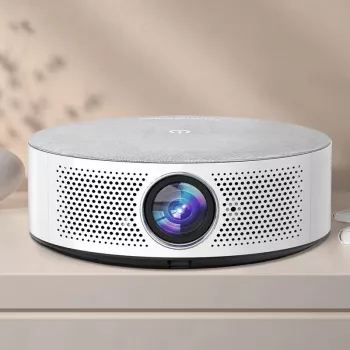
A quick reboot can clear a stuck focus routine. If your projector supports firmware updates, install the latest version to address known autofocus bugs. For a deeper setup walkthrough that includes focus, keystone, and placement tips, see this auto focus projector guide.
FAQ
Why is my projector focus blurry on one side?
This is usually caused by the projector being tilted or positioned off-center, creating an uneven throw angle. Level the projector, reduce keystone correction, and re-run focus after aligning it square to the screen.
Recommended for you


Find Your Perfect Jeans Fit: Rise, Cut & Fixes
May 28, 2026







Leave a comment